
Download Redoc – AI Writing Assistant for Faster Content Creation
Overview of Redoc – AI‑Powered Content Creation Tool
Redoc is an innovative AI‑driven writing assistant that helps professionals, students, and hobbyists generate high‑quality content in a fraction of the time it normally takes. Built as a web‑based application, Redoc combines sophisticated language models with an intuitive interface, offering everything from smart content prompts to real‑time editing assistance. Whether you’re drafting marketing copy, academic essays, or social‑media posts, Redoc’s AI engine can suggest ideas, expand outlines, and rewrite paragraphs with a focus on tone, readability, and SEO‑friendly language.
The platform also includes a built‑in satisfaction guarantee and a 7‑day refund policy, which gives users confidence that the tool delivers on its promise of speed and quality. Subscription plans are flexible, ranging from low‑volume word limits for occasional users to unlimited tiers for power writers, ensuring that every budget can find a suitable option. Because it runs entirely in the browser, there’s no need for heavy installations, and all data is processed securely using encrypted connections, making Redoc a reliable choice for anyone looking to overcome writer’s block and boost productivity.
Core Features that Power Your Writing Workflow
- AI‑Generated Content Prompts: Instantly receive topic ideas, headlines, and paragraph starters tailored to your niche.
- Real‑Time Editing Assistance: Grammar, style, and tone suggestions appear as you type, helping you polish drafts on the fly.
- Advanced Text Generation: Generate up to 2,000 words per session with contextual awareness, ensuring coherence across long pieces.
- Rewrite & Rephrase Engine: Easily transform existing paragraphs into fresh variations while preserving meaning.
- Custom Word‑Limit Plans: Choose from free, starter, professional, and enterprise subscriptions to match your writing volume.
- Collaboration Mode: Share a live editing link with teammates for simultaneous feedback and brainstorming.
- Secure Cloud Storage: All drafts are saved securely with end‑to‑end encryption, allowing you to access work from any device.
- 7‑Day Money‑Back Guarantee: Test the platform risk‑free; if it doesn’t meet expectations, request a full refund.
Installation, Usage & Compatibility
Redoc is a pure web application, which means there is no traditional installation process. To get started, simply visit the official Redoc website, create a free account, and select the subscription tier that fits your needs. The onboarding wizard guides you through setting up your profile, selecting preferred writing styles, and configuring language preferences.
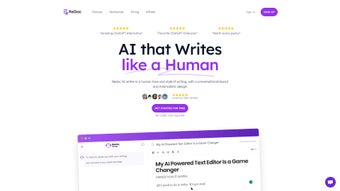
Once logged in, the dashboard presents a clean workspace with a left‑hand panel for prompts and a central editor where the AI interacts with you in real time. To generate content, type a brief description or select a pre‑built template; Redoc’s engine then produces suggestions that you can accept, edit, or discard. The built‑in toolbar offers quick actions such as “Rewrite,” “Expand,” and “Summarize,” enabling you to iterate without leaving the page.
Because Redoc runs in any modern browser, it is compatible with Windows, macOS, Linux, Android, and iOS devices. The platform is optimized for Chrome, Edge, Firefox, and Safari, ensuring a responsive experience on desktops, tablets, and smartphones. For teams that require offline access, Redoc provides a progressive web app (PWA) option that caches the interface, allowing you to draft ideas even without an active internet connection—though AI generation resumes once connectivity is restored.
Pros, Cons, Frequently Asked Questions & Final Verdict
Pros
- Lightning‑fast AI generation saves hours on research and drafting.
- User‑friendly interface suitable for both beginners and seasoned writers.
- Flexible subscription plans with a generous free tier.
- Secure, encrypted cloud storage protects sensitive content.
- Cross‑platform compatibility ensures access from any device.
Cons
- Advanced features such as collaboration are locked behind higher‑tier plans.
- Heavy reliance on internet connectivity for AI processing.
- Occasional AI hallucinations may require manual fact‑checking.
Frequently Asked Questions
Is Redoc really free to use?
Redoc offers a free tier that includes up to 500 words per month, basic prompts, and standard editing assistance. For higher word limits and premium features, you’ll need a paid subscription.
Can I use Redoc on my mobile phone?
Absolutely. Redoc is fully responsive and works in mobile browsers on iOS and Android. A progressive web app (PWA) is also available for offline drafting.
How secure is my data?
All documents are stored with end‑to‑end encryption, and Redoc complies with GDPR and CCPA standards. Your drafts never leave the secure cloud without your explicit permission.
What happens if the AI produces inaccurate information?
Redoc’s AI is designed for drafting and ideation, not for final fact‑checking. We recommend reviewing any generated content for accuracy, especially for technical or legal documents.
Is there a money‑back guarantee?
Yes. Redoc offers a 7‑day full refund policy for any paid subscription, giving you risk‑free time to test the platform.
Conclusion & Call to Action
Redoc delivers on its promise of accelerating the writing process with AI‑enhanced prompts, real‑time editing, and flexible subscription options. While power users may crave deeper collaboration tools, the core experience is robust enough for marketers, educators, and freelancers alike. If you’re ready to cut down on writer’s block and produce polished copy faster, click the button below to start your free trial or upgrade to a plan that matches your word‑count needs.



.png)



